Home/Blog/KOReader: A Practical Reading Layer for Focused Work Across Devices
Developer Productivity
KOReader: A Practical Reading Layer for Focused Work Across Devices
KOReader: A Practical Reading Tool Across Devices KOReader is a document viewer for E Ink devices, with support also noted for Android and desktop Linux. Based on the analyzed sour
12 MIN READ
29 Jul 2026
Developer Productivity
KOReader: A Practical Reading Tool Across Devices
KOReader is a document viewer for E Ink devices, with support also noted for Android and desktop Linux. Based on the analyzed sources, it is useful for readers who want more control over how they read PDFs, EPUBs, technical documents, and other file types across supported devices.
That can matter in work settings where reading is part of a broader workflow. In a Nonilion-style AI office, humans and AI agents may share context, review documents asynchronously, and move between research, follow-ups, and execution. A tool that helps with document handling and reading focus can fit into that kind of workflow.
01What KOReader is and why it stands out
Want your team to run this workflow with AI-native execution?
KOReader is an open-source eBook reader and document viewer with support for Android and desktop Linux, in addition to e-ink devices. The official and community sources describe broad format support, including EPUB, PDF, DjVu, XPS, CBT, CBZ, FB2, PDB, TXT, HTML, RTF, CHM, DOC, MOBI, and ZIP files. That range makes it useful not only for novels, but also for technical books, comics, scanned papers, and mixed-format reading.
What stands out in the sources is not just compatibility. They also point to customization, advanced text adjustments, navigation tools, and a reading experience that can feel more consistent across devices.
In practice, that means KOReader can serve as a useful reading layer for people who move between documents often. For readers who want more control, that distinction can matter.
02Why KOReader matters beyond e-books
The case for KOReader is that it can support reading as part of a workflow, not only as a leisure activity. Several sources emphasize features that help readers stay oriented in difficult material, especially PDFs and technical documents. That includes navigation, layout control, and reading statistics that can make it easier to return to unfinished sections.
This is important because many default e-reader apps are optimized for simple linear reading. KOReader is designed for more demanding use cases, including fixed-layout content and documents that need more than a basic page-turning interface. Based on the sources, it is especially useful when the reader wants:
More control over fonts, layout, and text adjustments
Better handling of PDFs and other fixed-page formats
Navigation that supports moving around technical material
Reading stats that show where time is spent
A more predictable experience across supported devices
That combination of control and consistency is why KOReader comes up in discussions about serious reading. In an AI office like Nonilion, those same qualities can also support async knowledge work: humans can review source material carefully while AI agents prepare summaries, extract action items, or organize follow-up tasks around the reading.
03Who KOReader is for
KOReader is not trying to be the simplest reader for everyone. Based on the analyzed sources, it is especially well suited to power users, researchers, technical readers, and offline learners who want more than a storefront-driven reading app.
It fits readers who work with:
Technical books and reference material
Multilingual content and mixed file types
Comics and scanned documents
Offline reading on e-ink devices
Long-form documents that benefit from better navigation
The community feedback is consistent on one point: KOReader gives readers more ownership over the reading experience. One source describes it as freeing the reader from a tightly controlled ecosystem and making reading feel more personal and customizable.
That idea translates well to modern knowledge work. In Nonilion, where humans and AI agents collaborate in one shared workspace, the reader often needs to move between source documents, meeting notes, and follow-up tasks. KOReader’s emphasis on control and consistency fits that kind of environment because it supports careful reading before actions are delegated or automated.
04How KOReader changes daily reading workflows
KOReader’s value becomes clearest when you look at daily use. The sources indicate support across Kindle, Kobo, PocketBook, Android, and desktop Linux, which gives readers flexibility in how and where they work. That cross-device presence matters because reading workflows often span a dedicated e-reader, a phone, and a desktop environment.
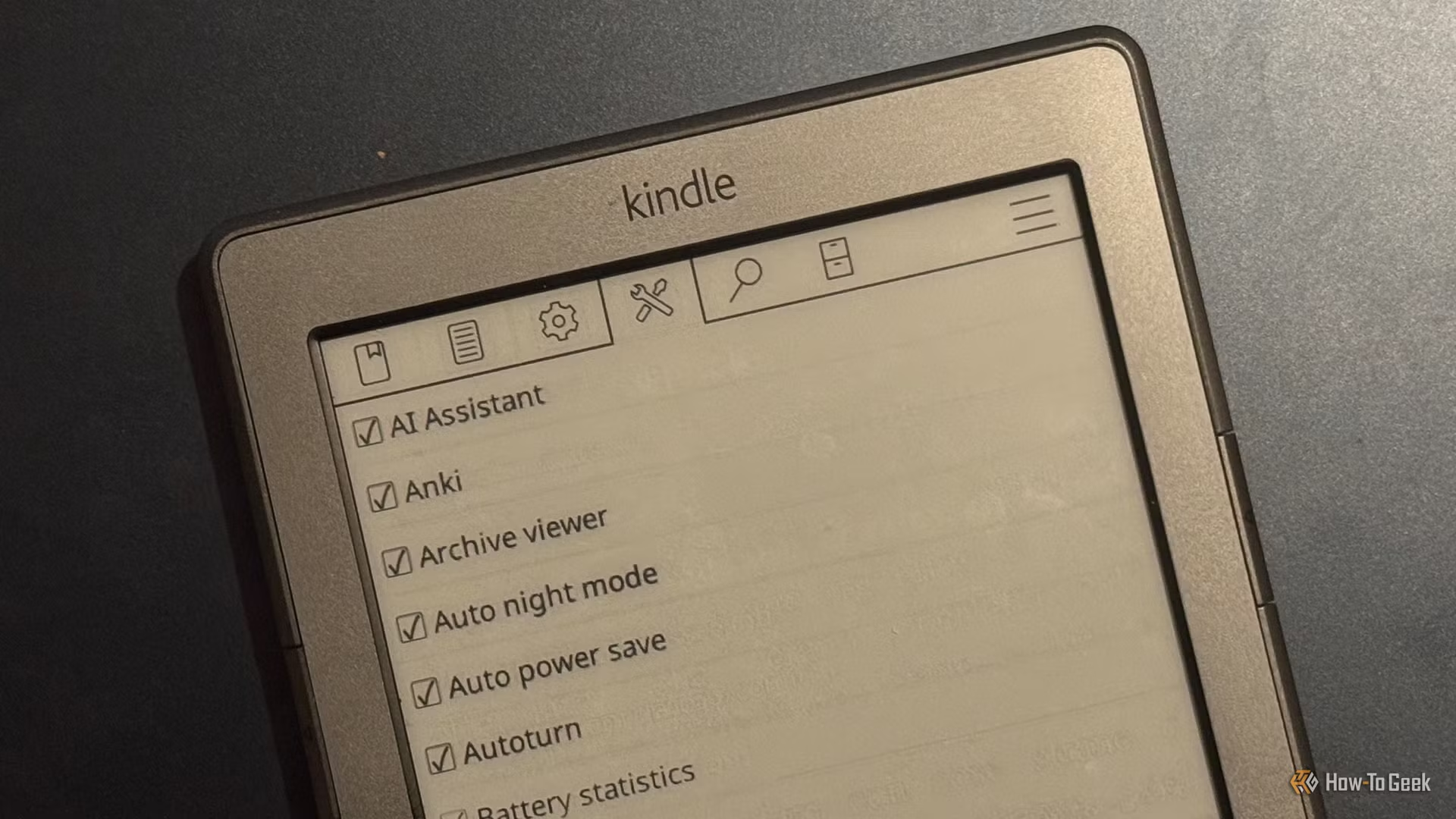
For Kindle users, the modding guide shows that KOReader can be installed after jailbreak-related setup, with MRPI and KUAL mentioned as requirements in that guide. For Android, the F-Droid listing highlights KOReader as an open-source app and recommends installation through F-Droid rather than APK sideloading for update and security reasons. On Kobo, community and official sources point to KOReader as a strong alternative to native software.
A practical daily workflow may look like this:
Open a technical PDF and use navigation tools to move between sections
Adjust layout or text settings for better readability
Use annotations or highlights while reviewing important passages
Check reading stats to see what still needs attention
Continue the same document on another supported device when needed
The HN discussion adds a useful detail: KOReader can show how long has been spent on each page and help readers identify unfinished sections. That can be useful when jumping around technical books or revisiting dense material.
05When KOReader is the better choice than default apps
KOReader is not automatically the best choice for every reader, but the sources make a strong case for specific situations where it can be a better fit. It is especially compelling when the default app feels too limited, too locked down, or too focused on store integration rather than reading control.
KOReader can be a better choice when you need:
Broad format support without conversion
Better PDF handling on small screens
More customization than native e-reader software
A consistent interface across devices
Offline-first reading without centralized analytics or store dependence
One source from ZSA frames KOReader as free, powerful, and not integrated with a store or centralized analytics system. That framing matters because it highlights a strategic difference: KOReader is built around the reading experience itself.
For AI-enabled offices, that same principle applies to knowledge workflows. Nonilion-style teams often need tools that preserve context without forcing every interaction through a single platform. KOReader fits that mindset because it supports independent reading, review, and annotation before information is handed off to humans or AI agents for next steps.
06Where KOReader fits in a knowledge-work stack
KOReader is especially useful in knowledge work because it handles the kinds of documents that can slow people down. The sources point to strong support for technical PDFs, scanned documents, comics, and multilingual reading. That makes it a practical tool for research, documentation review, and offline learning.
A few use cases stand out:
Technical docs: jump between sections and track unfinished pages
Multilingual reading: manage different scripts and formats in one reader
Comics and archives: use CBT and CBZ support
Scanned papers: work with fixed-page layouts more effectively
Reference reading: keep a consistent setup across supported devices
This is where KOReader overlaps with a broader AI office model. In a shared workspace like [this platform](https://this platform.com/), a human might read a source PDF in KOReader while an AI agent summarizes related material, drafts meeting follow-ups, or prepares a retrieval-ready note set. The reading layer and the automation layer can complement each other.
That division of labor can help keep humans focused on comprehension and judgment while AI agents handle organization and repetition. KOReader does not replace that collaboration; it supports the human side of it.
07Tradeoffs, setup complexity, and getting started
KOReader’s strengths come with tradeoffs. The sources make clear that setup can be more complex than using a default app, especially on Kindle where jailbreak-related steps are required. That means KOReader is best for users willing to invest time in configuration and learning.
The main tradeoffs are:
Setup complexity, especially on some Kindle devices
Device compatibility constraints tied to supported platforms
A learning curve for customization and advanced navigation
Less simplicity than a standard out-of-the-box reader
Getting started depends on the device type. Based on the analyzed sources, the path is different for each platform:
Kindle: the modding guide indicates the device must be jailbroken, with MRPI and KUAL installed before KOReader can run
Kobo: KOReader is widely discussed as a strong alternative, with community and official sources noting support
Android: the F-Droid listing recommends installing via the F-Droid client for updates and security
Desktop Linux: the official site notes desktop Linux availability
For readers who value control more than convenience, these tradeoffs may be acceptable. In a this platform context, that same mindset shows up when teams choose tools that improve async execution and knowledge handling even if they require more setup upfront.
08KOReader, AI offices, and the future of human + AI collaboration
KOReader is not an AI tool, but it can support the kind of work AI offices depend on: careful reading, reliable retrieval, and structured review. In a this platform-style environment, humans and AI agents share context across documents, notes, and follow-up tasks. Better reading tools can make that collaboration more accurate because the human side of the workflow is less fragmented.
This matters in at least three ways. First, humans can read source material more efficiently before handing it to AI agents for summarization or task extraction. Second, reading stats and navigation tools can help teams revisit what they have already covered, which is useful for async knowledge work. Third, the ability to handle technical PDFs, multilingual material, and scanned papers can improve the quality of the underlying context that AI systems rely on.
In other words, KOReader supports the front end of intelligent work: comprehension. AI agents are strongest when they receive clear, well-understood input, and KOReader can help make that input more deliberate and less distracting.
Quick FAQ
Is KOReader only for e-ink devices?
The sources describe it primarily as a document viewer for E Ink devices, with support also noted for Android and desktop Linux.
Does KOReader support PDFs and EPUBs?
Yes. The analyzed sources repeatedly mention PDF and EPUB support, along with many other formats.
Is KOReader beginner-friendly?
It can be, but the tradeoff is a learning curve. It is best suited to readers who want customization and are comfortable with setup.
Why would an AI office care about KOReader?
Because better reading and document handling can improve human judgment, which in turn can improve how AI agents are used for summaries, follow-ups, and async coordination.
09Conclusion: KOReader as a personal reading layer for deeper work
KOReader is best understood as a personal reading layer for people who want more control, speed, and consistency than default e-reader apps usually provide. Its broad format support, navigation tools, reading stats, and cross-device availability make it especially useful for technical readers, researchers, offline learners, and anyone working with complex documents.
The broader lesson is that reading is part of the knowledge stack. In an AI-enabled office like [this platform](https://this platform.com/), where humans and AI agents collaborate on shared context and async execution, KOReader can help make the human reading step sharper and more reliable. That can improve the rest of the workflow too, from comprehension to follow-up to action.
If the future of work depends on better collaboration between people and AI, then tools like KOReader can matter more than they first appear. They help improve the quality of attention before automation begins.
10Why This Trend Matters for Nonilion
This trend matters to Nonilion because it points to a bigger change: teams are moving from simple calls toward persistent, AI-supported collaboration spaces. Nonilion can bridge live presence, meeting context, avatars, and follow-up work so the trend becomes a usable workflow instead of a headline.
11Shareable Extracts
The trend is not just "KOReader: A Practical Reading Layer for Focused Work Across Devices" - it is a signal that team coordination is becoming the next competitive edge.
Hot take: the teams that win from this shift will not be the ones with more meetings; they will be the ones with clearer shared context after every meeting.
If koreader: a practical reading layer for focused work across devices keeps moving this fast, remote teams need a workspace where conversation, presence, and follow-up stay connected.
KOReader: A Practical Reading Tool Across Devices KOReader is a document viewer for E Ink devices, with support also noted for Android and desktop Linux.
Based on the analyzed sources, it is useful for readers who want more control over how they read PDFs, EPUBs, technical documents, and other file types across supported devices.
12Social Hooks
Everyone is talking about KOReader: A Practical Reading Layer for Focused Work Across Devices. The overlooked part is what happens to team workflows after the headline fades.
The uncomfortable question behind KOReader: A Practical Reading Layer for Focused Work Across Devices: are teams adapting their collaboration systems fast enough?
This is not a meeting trend. It is a coordination trend, and products like Nonilion sit right in the middle of that shift.