Home/Blog/Show HN: Marelleo – An Open-Source Story Box Built with ESP32, A Blueprint for Future Innovation
AI-native teamwork
Show HN: Marelleo – An Open-Source Story Box Built with ESP32, A Blueprint for Future Innovation
Show HN: Marelleo – An Open-Source Story Box Built with ESP32, A Blueprint for Future Innovation Why I built it The original idea was simple: give my kids a physical object that co
16 MIN READ
31 Oct 2026
AI-native teamwork
Show HN: Marelleo – An Open-Source Story Box Built with ESP32, A Blueprint for Future Innovation
01Why I built it
The original idea was simple: give my kids a physical object that could play stories without turning story time into another screen session.
We already had access to audiobooks, podcasts, and streaming services, but each option came with friction. A phone is distracting, a tablet is too tempting, and a smart speaker makes it difficult to know exactly what is being played. I wanted something that would feel more like a toy than a computer: press a button, choose a story, and listen.
Want your team to run this workflow with AI-native execution?
Marelleo is an open-source story box based on an ESP32. It is designed to play locally stored audio, provide simple physical controls, and make it possible for parents to add or replace content without depending on a proprietary platform. The project is deliberately modest. It does not try to compete with commercial smart speakers or build a complete media ecosystem. It focuses on one thing: making independent listening easy for children.
The name came from the way my kids pronounced a word while we were experimenting with the first enclosure. It stuck.
02The design goals
Before writing code or drawing the enclosure, I made a short list of requirements:
No screen.
No account required for everyday use.
No microphone or always-on voice assistant.
Works without an internet connection after setup.
Large, recognizable controls.
Simple enough for a child to operate independently.
Easy for an adult to update.
Uses affordable, widely available parts.
Can be repaired instead of discarded.
These constraints shaped nearly every decision. For example, a phone-based control interface would have been convenient, but it would also have made the box dependent on another device. Similarly, streaming audio would have reduced local storage requirements but introduced network reliability, authentication, and privacy concerns.
The result is intentionally closer to a dedicated music player than to an IoT appliance.
03Hardware overview
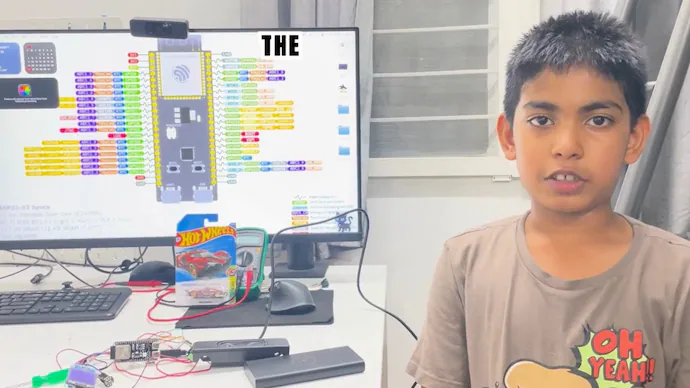
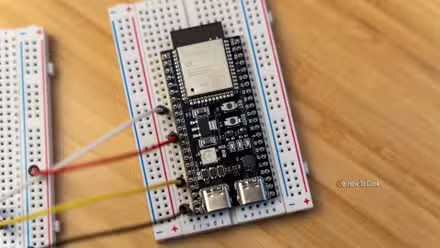
The core of Marelleo is an ESP32 development board. The ESP32 provides enough processing power for audio playback and control logic while keeping the project inexpensive and accessible. It also leaves room for future features such as wireless configuration or remote content synchronization, although the current design does not require a network connection during playback.
The remaining components are fairly ordinary:
An ESP32 board.
A small audio amplifier.
A speaker suitable for spoken-word playback.
Physical buttons or switches.
A rotary control for volume or navigation.
A rechargeable battery and charging circuit.
Removable or onboard storage for audio files.
Status LEDs.
A custom or 3D-printed enclosure.
Wiring, connectors, and a power switch.
The exact component choices can vary. One advantage of using common modules is that builders can adapt the project to parts already available in their workshop. Someone may prefer a different speaker, a larger battery, or a board with integrated storage. The software is organized so that these hardware changes do not require redesigning the whole project.
The speaker choice matters more than I initially expected. Spoken audio does not need the same low-frequency response as music, but clarity is important. A small speaker mounted directly behind a thick enclosure wall sounded noticeably duller than one with a proper grille and enough air space around it. Moving the speaker opening and adding simple internal clearance made a larger improvement than changing the amplifier.
04Controls designed for children
The physical interface is the most important part of the box.
A child should not need to understand folders, file names, Bluetooth pairing, or operating-system conventions. The controls therefore use familiar actions:
Start or pause the current story.
Move to the previous or next item.
Adjust the volume.
Return to the beginning.
Turn the device on or off.
The buttons are intentionally large and spaced apart. During early testing, I used small tactile switches mounted on a breadboard. They worked electrically, but they were difficult to press reliably and encouraged children to poke at the circuit board. Replacing them with larger panel-mounted buttons made the device feel much more like a finished object.
Long presses and short presses are useful for adding functionality without adding more controls. A short press can skip to the next story, while holding the same button can fast-forward. A long press on the playback button can save the current position or shut the device down, depending on the mode.
There is a trade-off here. More gestures reduce the number of physical controls, but they also make the device harder to discover. I have tried to keep the common actions immediate and reserve long presses for less frequent operations.
Visual indicators are kept simple. A few LEDs can show power, charging, playback, or an error condition, but the box should not require a child to interpret a complex light code. The main feedback should come from the audio itself and from the physical response of the buttons.
05Audio organization
Marelleo treats audio as a collection of stories rather than a general-purpose file system.
Each story can contain an audio file and optional metadata such as a title, category, or cover color. The metadata is useful for adults managing the library, while the child-facing interface can remain physical and uncomplicated.
The precise naming convention is less important than consistency. Predictable file names make it easier to copy new content onto the device and troubleshoot problems when something does not appear.
Audio files should be prepared with the constraints of the hardware in mind. Spoken-word recordings generally do not need high bitrates or very high sample rates. Smaller files mean faster transfers, lower storage use, and less work for the device. Converting everything to a compatible format also avoids situations where one recording plays correctly while another produces silence or glitches.
One practical lesson was to normalize volume before copying stories to the device. Recordings from different sources often have very different loudness levels. Without normalization, a child may need to adjust the volume every time the story changes. Consistent levels make the box easier to use and reduce the likelihood of unexpectedly loud playback.
The project does not include copyrighted stories. Builders should use audio they created themselves, material distributed under an appropriate license, or content they have permission to use. Public-domain status and recording rights are separate questions: a story may be old enough to be public domain while a particular modern recording remains copyrighted.
06Firmware structure
The firmware is divided into a few straightforward responsibilities:
Read button and control input.
Maintain playback state.
Decode and stream audio.
Drive the amplifier and speaker.
Store settings such as volume and the last position.
Report errors in a way that is useful during development.
The main loop needs to remain responsive while audio is playing. A button press should not be ignored simply because the decoder is busy. This means the input handling and playback code cannot be written as one long blocking sequence. Instead, the firmware checks controls regularly and lets the audio layer process data in manageable steps.
Playback state is treated separately from the user interface. The current story, position, volume, and paused state are stored in a small state object. That makes it easier to support different control schemes and to test behavior without connecting the full enclosure.
Saving state also requires care. Writing to flash every time a button is pressed can wear out the storage and may interrupt playback. Marelleo therefore saves only when necessary, such as after a meaningful change or during a controlled shutdown. A small delay before committing a new position can also prevent repeated writes while a child is rapidly pressing controls.
07Power and safety
A battery-powered device used by children needs more attention than a desk prototype.
The battery must be protected against overcharging, excessive discharge, and short circuits. The charging connector should be mechanically secure, and exposed conductors should be insulated. If a lithium battery is used, it should be sourced from a reputable supplier and paired with an appropriate charging and protection circuit.
The enclosure should prevent easy access to the battery and wiring. This is especially important for younger children, who may treat every opening as an invitation to investigate. Screws, magnets, and small removable parts should not be accessible during normal use.
Marelleo is not a certified children’s product, and the open-source design should not be treated as a substitute for product-safety testing. Anyone building a version for children should inspect the finished device for sharp edges, loose parts, overheating, exposed contacts, and battery damage. Charging should be supervised according to the battery and charger manufacturer’s instructions.
Battery life depends on the speaker volume, amplifier efficiency, battery capacity, and software configuration. In practice, optimizing idle behavior can be as useful as installing a larger battery. The ESP32 and amplifier should not remain fully active when the box is paused or switched off. A proper power switch and low-power mode extend runtime and reduce heat.
08Enclosure experiments
The first enclosure was a cardboard prototype. It looked unremarkable, but it answered important questions quickly:
Were the controls in sensible positions?
Could small hands hold the box securely?
Was the speaker opening large enough?
Would the power connector be easy to reach?
Did the device slide around during use?
Only after testing those details did I move to a more permanent enclosure.
A 3D-printed case makes iteration convenient, but it is not the only option. A wooden box, laser-cut panels, or a repurposed project enclosure can work just as well. The important features are durability, access to the controls, ventilation where needed, and enough internal room to route wires safely.
Rounded corners help the box feel like a toy and make it more comfortable to carry. I also found that placing the speaker on the front rather than the bottom produces more consistent sound when the device is placed on a bed or table.
The enclosure is split into sections so that the electronics can be removed without destroying the case. Connectors are used where possible instead of permanently soldering every wire directly to a board. This adds a little complexity during assembly but makes repairs much easier.
09Adding new stories
The intended workflow for an adult is simple:
Connect the device to a computer.
Open its storage.
Copy compatible audio files into the appropriate directory.
Safely eject the device.
Turn it on and allow the library to refresh.
The goal is not to require a development environment every time someone wants to add a story. Firmware development and content management are separate activities. Once the device is assembled and programmed, adding audio should be possible for someone who is comfortable copying files.
Future versions may include a wireless setup page for managing the library, but that feature is deliberately optional. A web interface would be useful for users who do not want to remove storage, yet it would also introduce more code, more power consumption, and more opportunities for configuration problems.
10What did not work
The first prototype had several problems.
The controls were too small. The speaker was too quiet in a noisy room. The battery indicator was confusing. The firmware sometimes restarted when the volume was changed quickly because the amplifier caused a brief power fluctuation. None of these issues was particularly difficult to fix, but they were hard to notice when testing only at a workbench.
Testing in the actual environment was essential. A story box that sounds fine beside a computer may be difficult to hear from the other side of a bedroom. A control that seems obvious to an adult may be ignored by a child. A cable that is neatly routed during assembly may become a loose loop after the device has been carried around for a week.
I also learned not to over-design the first version. It is tempting to add Bluetooth, a display, voice recognition, multiple user profiles, and remote synchronization immediately. Each feature has a plausible use case, but each also increases cost and maintenance. The basic experience was already useful without them.
11Why open source?
Open source makes this project more useful than a single finished box.
The hardware can be adapted to different speakers, batteries, and enclosure materials. The firmware can be inspected and modified. Families can remove features they do not want, translate labels, add accessibility controls, or create an interface suited to a child with different needs.
It also makes the project easier to repair. If a button fails, the owner should be able to identify the part and replace it. If the original ESP32 board becomes unavailable, the community can document compatible alternatives rather than treating the entire device as obsolete.
The repository includes the source code, wiring information, assembly notes, and files for the enclosure. I am especially interested in improving the documentation around component substitutions. Hardware availability changes quickly, and an open design is only practical if people can build it with reasonably accessible parts.
12Future ideas
There are several directions I would like to explore:
A more efficient sleep mode.
A clearer battery-status indicator.
Support for playlists and multi-part stories.
A physical token system for selecting content.
Better recovery when an audio file is damaged.
Optional wireless updates for advanced users.
More accessible controls for children with limited dexterity.
A smaller travel version and a larger version with better acoustics.
I am cautious about adding a screen. A small display could help adults manage the library, but it would change the character of the device and make it less screen-free. One possibility is an optional maintenance mode that is available only when the box is connected to a computer.
The most interesting idea is probably physical story tokens. A token could represent a category or a specific story, allowing a child to choose content by placing it on the box. That would require additional hardware and a more complex user interface, but it could make the selection process more tangible and accessible.
13What I would like feedback on
I would especially appreciate feedback from people who have built similar devices.
Which ESP32 audio libraries have been reliable for long playback sessions?
What enclosure materials hold up best to repeated handling?
Are there recommended approaches for safely managing battery charging in a child-oriented project?
How should the content format be documented so that non-technical parents can add stories easily?
Would you prefer removable storage, USB file transfer, or optional wireless management?
What accessibility improvements would make the controls more useful?
Marelleo is still a small project, but that is part of its appeal. It does not need to become a full commercial platform to be worthwhile. A box that lets a child choose a story independently, without a screen and without sending audio requests to a remote service, already solves the problem I set out to solve.
The complete design is available as an open-source starting point. Build it exactly as documented, adapt it to the parts you have, or use the software and ideas in a different enclosure. If you make a version, I would be happy to see what you changed and what your children thought of it.
For Show HN: Marelleo, an open-source story box I built for my kids using ESP32, Nonilion can be used as the practical AI-office example: a shared workspace where human teammates and AI agents keep discussion, decisions, and execution connected.
The reason Show HN: Marelleo, an open-source story box I built for my kids using ESP32 keeps returning to Nonilion is simple: the topic becomes more useful when it turns into coordinated work, not just another article, chat, or dashboard.
14Why This Trend Matters for Nonilion
This trend matters to Nonilion because it points to a bigger change: teams are moving from simple calls toward persistent, AI-supported collaboration spaces. Nonilion can bridge live presence, meeting context, avatars, and follow-up work so the trend becomes a usable workflow instead of a headline.
15Shareable Extracts
The trend is not just "Show HN: Marelleo – An Open-Source Story Box Built with ESP32, A Blueprint for Future Innovation" - it is a signal that team coordination is becoming the next competitive edge.
Hot take: the teams that win from this shift will not be the ones with more meetings; they will be the ones with clearer shared context after every meeting.
If show hn: marelleo – an open-source story box built with esp32, a blueprint for future innovation keeps moving this fast, remote teams need a workspace where conversation, presence, and follow-up stay connected.
We already had access to audiobooks, podcasts, and streaming services, but each option came with friction.
A phone is distracting, a tablet is too tempting, and a smart speaker makes it difficult to know exactly what is being played.
16Social Hooks
Everyone is talking about Show HN: Marelleo – An Open-Source Story Box Built with ESP32, A Blueprint for Future Innovation. The overlooked part is what happens to team workflows after the headline fades.
The uncomfortable question behind Show HN: Marelleo – An Open-Source Story Box Built with ESP32, A Blueprint for Future Innovation: are teams adapting their collaboration systems fast enough?
This is not a meeting trend. It is a coordination trend, and products like Nonilion sit right in the middle of that shift.
I Turned a Failed Prototype Into a Product People Actually Want
www.google.com/goto
Author
This article on Show HN: Marelleo, an open-source story box I built for my kids using ESP32 was generated by the Nonilion AI blog workflow using web research inputs and AI-assisted synthesis.