Home/Blog/Grok Build: what it is, why it matters, and what comes after the terminal-first AI agent
Developer Productivity
Grok Build: what it is, why it matters, and what comes after the terminal-first AI agent
Grok Build: what it is, and what it suggests about terminal-first AI agents Grok Build is presented in the source material as a terminal-based AI coding agent. It runs from the ter
14 MIN READ
24 Jul 2026
Developer Productivity
Grok Build: what it is, and what it suggests about terminal-first AI agents
Grok Build is presented in the source material as a terminal-based AI coding agent. It runs from the terminal, works with codebases, edits files, and executes tasks. The available descriptions also point to features such as a fullscreen terminal UI, mouse support, Plan Mode integration, and subagent-related workflows.
The broader takeaway is less about any single feature and more about the workflow shift it represents: from isolated coding help toward more coordinated human + AI collaboration. In that context, tools like Nonilion can be relevant as a shared layer for briefs, handoffs, approvals, and follow-ups around agent-driven work.
01Grok Build explained: what it is and why it matters now
Want your team to run this workflow with AI-native execution?
The source material describes Grok Build as a coding agent that runs from the terminal. The GitHub repository summary says it is a terminal-based AI coding agent with a full-screen TUI that understands codebases, edits files, and executes tasks. The official launch page also frames it as a coding agent for software engineering and complex coding work.
That terminal-first design places the agent directly inside the developer’s working environment. Instead of treating AI as a separate chat window, Grok Build is positioned as part of the coding workflow.
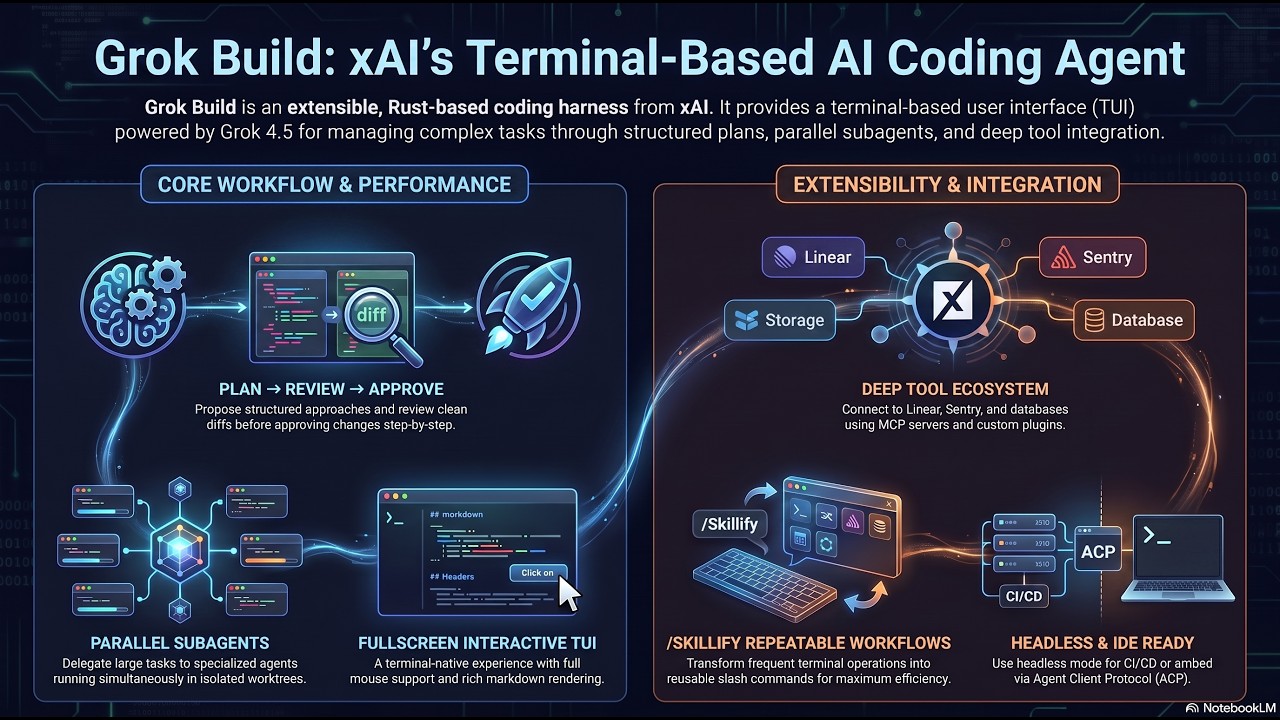
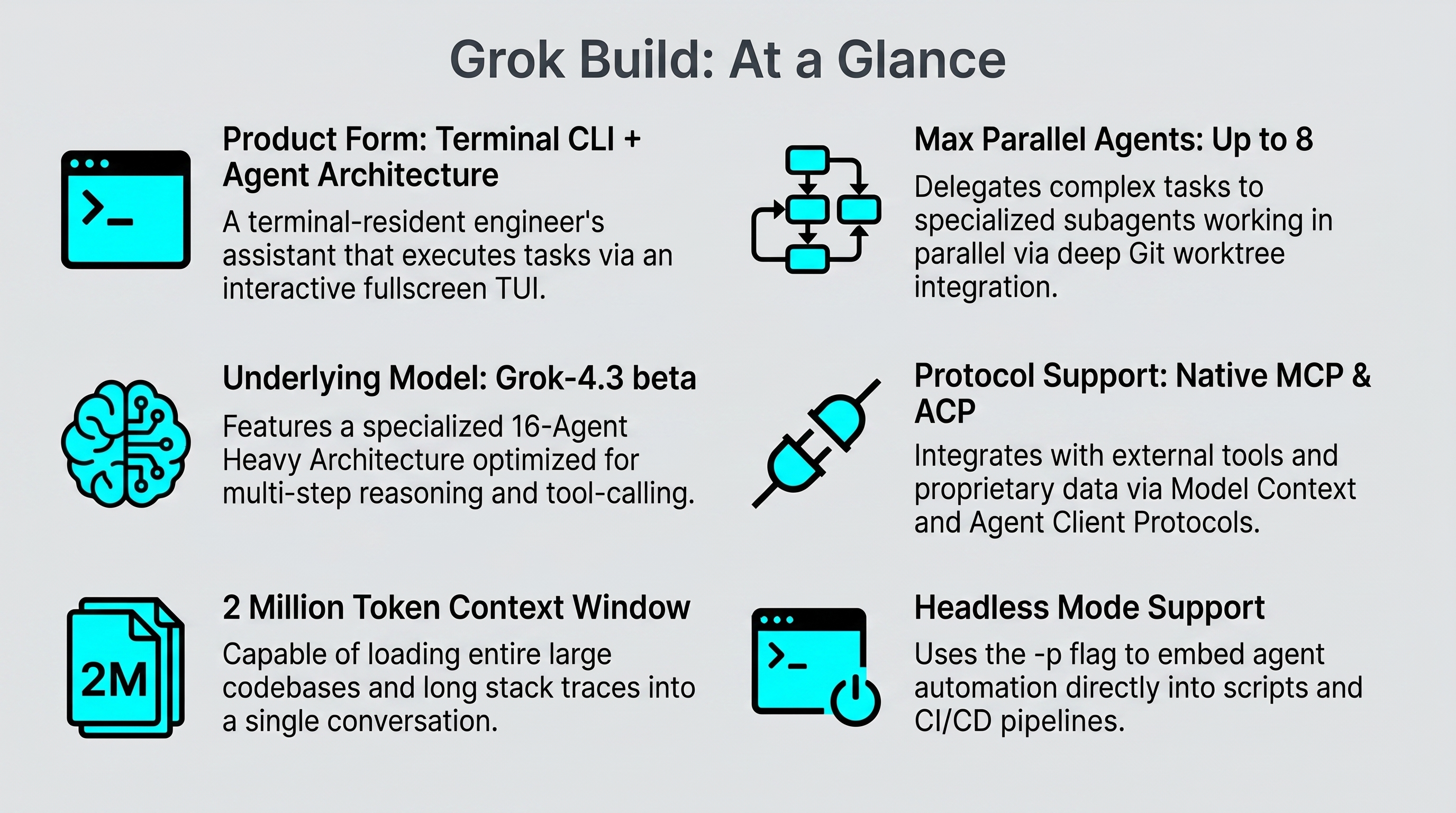
The launch details point to several specific capabilities. Grok Build is described as being powered by Grok 4.5, and the source material also mentions a native subagent view, Plan Mode integration, mouse support, and a fullscreen terminal UI.
Other source material adds that Grok Build lets the main agent spawn independent child agents, or subagents, each with its own context window and a defined persona. That suggests a system designed not only for prompting, but for breaking work into structured tasks.
Why this launch matters in the broader shift toward agentic software development
The launch can be read as part of a broader move from chat-based assistance toward more agentic software workflows. OpenRouter’s summary describes Grok Build 0.1 as a coding model trained for agentic software engineering, with emphasis on interactive coding agents, tool use, and multi-step development tasks.
In that sense, Grok Build points toward a workflow where the model is not only answering questions, but helping carry out work across multiple steps.
02How Grok Build changes the way developers work
From chat-based coding help to execution-oriented automation
Traditional coding assistants often help with snippets, explanations, or isolated edits. Grok Build is described differently because the sources position it as a terminal-based agent that can understand the codebase, edit files, and execute tasks in a full-screen environment.
That changes the developer’s role. The human is not only asking for help; they are supervising a system that can carry out parts of the work directly.
Subagents, delegation, and the rise of multi-step task orchestration
The subagent model is one of the clearest signals in the source data. A main agent can spawn independent child agents, each with its own context window and persona, which points to parallel decomposition of work.
This matters because software tasks are rarely single-step. A developer may need one agent to inspect code, another to propose changes, and another to support a specific subtask. Grok Build’s structure suggests a workflow built for orchestration rather than one-shot answers.
Where Grok Build is strongest: codebase understanding, edits, and tool use
Based on the available descriptions, Grok Build appears strongest when the task lives inside the codebase and the terminal. It is designed for code understanding, file edits, tool use, and multi-step development work.
That makes it relevant for engineering contexts where speed and direct control matter. The agent is not trying to be a general workplace hub; it is optimized for the coding loop.
Where the terminal-first model can create friction: oversight, context switching, and team visibility
The same terminal-first design that creates speed can also create friction. A solo terminal session can be efficient, but it may be harder for teammates to see what happened, review decisions, or stay aligned asynchronously.
That is where the limits become visible. The work may move quickly inside the terminal, but oversight, context switching, and team visibility still need a broader coordination layer.
03Grok Build vs shared AI workspaces: solo execution or coordinated collaboration?
The terminal AI agent model: speed, focus, and direct control
The terminal AI agent model is compelling when a developer wants focus and direct control. Grok Build’s fullscreen TUI, mouse support, and subagent structure all reinforce a hands-on execution style.
For individual contributors, that can be a major advantage. The agent stays close to the code, the developer stays close to the task, and the loop between intent and action is short.
The shared workspace model: observability, accountability, and async collaboration
A shared workspace model solves a different problem. Instead of optimizing only for execution, it supports observability, accountability, and async collaboration across people and AI agents.
That matters when a task crosses functions, needs approval, or must be handed off. In a shared workspace, the work can be visible to the broader team, not just the person at the terminal.
When a coding agent is enough—and when a broader AI office is the better fit
A coding agent is enough when the task is contained, technical, and mostly local to one developer’s workflow. Grok Build fits that pattern based on the sources.
A broader AI office is the better fit when the work includes planning, communication, follow-up, and cross-functional coordination. That is where a tool like Nonilion becomes relevant: not as a replacement for the coding agent, but as the shared operating layer around it.
Practical decision guide for teams choosing between terminal-first and workspace-first AI
Use this simple lens:
Choose terminal-first AI when the work is code-heavy, execution-oriented, and owned by one developer.
Choose workspace-first AI when multiple people need visibility, approval, or async handoffs.
Use both when the agent executes and the team still needs shared context.
That hybrid model is often the most realistic path for modern teams.
00What Grok Build means for AI offices like Nonilion
From one developer’s terminal to a coordinated human + AI operating system
This is where the broader strategic shift appears. Grok Build shows how useful a terminal-first agent can be, but it also highlights the need for a coordinated human + AI operating system around it.
Nonilion fits that gap as a shared AI office where work does not disappear into a single session. It can support the surrounding workflow that turns execution into team progress.
How AI agents fit into a shared office workflow: briefs, handoffs, approvals, and follow-ups
In a shared office model, AI agents are not isolated tools. They become participants in a workflow that includes briefs, handoffs, approvals, and follow-ups.
That is especially useful when one agent generates code changes, another helps summarize the result, and a human reviewer decides what moves forward. The office layer keeps the work organized across those steps.
Why this platform matters for cross-functional coordination beyond the code editor
This platform matters because many real tasks are not just coding tasks. They involve communication across operators, developers, and decision-makers, plus the need to keep everyone aligned while work moves asynchronously.
That is the practical difference between an AI agent and an AI office. The agent executes; the office coordinates.
The operational gap Grok Build does not solve on its own: meetings, alignment, and async execution
Grok Build does not appear, based on the sources, to solve meetings, alignment, or broader async execution on its own. It is a strong coding agent, but not a complete work environment.
That gap is where shared workspaces become important. When teams need to connect agent output to project decisions, this platform can serve as the coordination layer that keeps the human side of the process intact.
05From prompt to project: a practical workflow example
Starting a coding task in Grok Build
A developer might start by using Grok Build in the terminal for a codebase task. The agent can understand the repository, edit files, and execute steps in a full-screen TUI.
If the task is complex, subagents can help break it down into smaller parts. That makes Grok Build useful for fast, local execution.
Translating the same task into a team workflow inside this platform
Now imagine the same task in a shared workspace. The initial prompt becomes a brief, the agent output becomes a handoff, and the reviewer’s response becomes part of the project record.
Inside this platform, that same work can be tracked as a coordinated process rather than a private terminal session. The result is better visibility for the team and less risk of work getting lost between tools.
How humans and AI agents divide responsibilities across planning, execution, review, and communication
A practical division of labor looks like this:
Humans define goals, constraints, and approval criteria.
AI agents execute code-heavy subtasks and propose changes.
Humans review, decide, and communicate the outcome.
The workspace preserves context for follow-up.
This is the core of human + AI collaboration in an office model.
What gets better when the work lives in a shared workspace instead of a single session
When work lives in a shared workspace, teams gain continuity. They can see what was asked, what the agent did, and what still needs approval.
That reduces coordination overhead and makes async execution more reliable. It also helps teams move faster without sacrificing accountability.
06Adoption lessons: how to use Grok Build without creating new bottlenecks
Governance and approval flows for agent-driven coding
Agent-driven coding is powerful, but it needs governance. If a terminal agent can make edits and execute tasks quickly, teams still need approval flows that define who signs off and when.
That is especially important when the work affects shared codebases or production-facing systems. Speed without governance can create new bottlenecks later.
Keeping stakeholders aligned when agents work faster than humans can review
One of the biggest risks in agentic workflows is mismatch between execution speed and review speed. The agent may finish in minutes, while stakeholders still need time to assess the output.
Shared visibility helps here. A workspace like this platform can keep stakeholders aligned by preserving the task, the output, and the follow-up in one place.
Managing context, memory, and handoff quality across tools
Context is often lost when work jumps between terminal tools, chat interfaces, and team channels. The source material suggests Grok Build has strong local context handling through its coding-agent design, but that alone does not guarantee smooth handoffs.
Teams should therefore treat handoff quality as a process problem, not just a model problem. The better the handoff, the less rework downstream.
Metrics teams should watch: cycle time, review load, and coordination overhead
A practical adoption lens should include a few simple metrics:
Cycle time from task start to review-ready output
Review load on human teammates
Coordination overhead across tools and channels
If Grok Build improves execution but increases coordination friction, the net gain may be smaller than expected.
07The future of AI offices: where Grok Build fits in the stack
Terminal agents as execution layers, not complete work environments
The clearest takeaway from the sources is that Grok Build is an execution layer. It is a strong terminal-based agent for coding work, but it is not the full environment in which work gets coordinated.
That distinction matters. Execution is only one part of modern knowledge work.
Shared AI offices as the coordination layer above specialized agents
Shared AI offices sit above specialized agents and connect them to people, decisions, and follow-through. They are where briefs become tasks, tasks become outputs, and outputs become team actions.
This is where this platform fits contextually: as the layer that helps specialized agents become part of a broader operating system.
What a mature human + AI collaboration model looks like in practice
A mature model does not force every task into one interface. Instead, it lets terminal agents handle execution while a shared office handles coordination.
That means humans can work with AI agents without losing the structure needed for team collaboration. The result is a more complete human + AI workflow.
Why the next productivity leap depends on orchestration, not just model capability
Model capability matters, and Grok Build shows that clearly with Grok 4.5, subagents, and Plan Mode integration. But the next productivity leap will also depend on orchestration.
Teams need systems that connect agent output to real work across people, time, and context. That is why the future is not just better agents; it is better coordination around agents.
08Conclusion: Grok Build is a strong agent, but the bigger shift is the office around it
Grok Build is a notable terminal-first AI coding agent because it brings execution, subagents, Plan Mode, and a fullscreen terminal UI into the developer workflow. Based on the source material, it is especially relevant for codebase understanding, edits, tool use, and multi-step development tasks.
The strategic lesson is broader than the product itself. As AI offices evolve, a useful pattern may be to combine specialized agents with shared coordination layers. That is where this platform becomes relevant: as a workspace for briefs, handoffs, approvals, and async execution that turns isolated agent work into coordinated team progress.
Key takeaways for developers, operators, and team leads
Grok Build is best viewed as an execution-focused terminal agent.
Subagents and Plan Mode point toward multi-step orchestration.
Shared workspaces solve the collaboration gap that terminal tools do not.
Teams need both speed and visibility to make agentic workflows sustainable.
Why this platform represents the practical next step for coordinated AI work
This platform matters because it helps teams move from one developer’s terminal to a shared AI office where humans and AI agents can work together with clearer handoffs and better async coordination. In that sense, Grok Build is the agent, while this platform is the office around it.
09Why This Trend Matters for Nonilion
This trend matters to Nonilion because it points to a bigger change: teams are moving from simple calls toward persistent, AI-supported collaboration spaces. Nonilion can bridge live presence, meeting context, avatars, and follow-up work so the trend becomes a usable workflow instead of a headline.
10Shareable Extracts
The trend is not just "Grok Build: what it is, why it matters, and what comes after the terminal-first AI agent" - it is a signal that team coordination is becoming the next competitive edge.
Hot take: the teams that win from this shift will not be the ones with more meetings; they will be the ones with clearer shared context after every meeting.
If grok build: what it is, why it matters, and what comes after the terminal-first ai agent keeps moving this fast, remote teams need a workspace where conversation, presence, and follow-up stay connected.
Grok Build: what it is, and what it suggests about terminal-first AI agents Grok Build is presented in the source material as a terminal-based AI coding agent.
It runs from the terminal, works with codebases, edits files, and executes tasks.
11Social Hooks
Everyone is talking about Grok Build: what it is, why it matters, and what comes after the terminal-first AI agent. The overlooked part is what happens to team workflows after the headline fades.
The uncomfortable question behind Grok Build: what it is, why it matters, and what comes after the terminal-first AI agent: are teams adapting their collaboration systems fast enough?
This is not a meeting trend. It is a coordination trend, and products like Nonilion sit right in the middle of that shift.